
Rosebud Review: 2026 Overview
The verdict
3.9/ 5 An AI journaling app that asks thoughtful follow-up questions and surfaces patterns.
Rosebud is one of the better AI journaling apps — the follow-up questions make reflection feel like a conversation, and it spots patterns well. It's a focused journaling tool rather than a complete system.
Rosebud is an AI journaling app that turns writing into a guided conversation, asking thoughtful follow-up questions and surfacing patterns over time. The short version of this Rosebud journal review is that it is one of the better AI-guided reflection tools for people who think more clearly when something prompts them, though it is narrower than an all-in-one personal development app.
It runs on iOS, Android, and the web, leans on reflective and CBT-style prompts, and includes crisis resources, which matters in a tool this personal.

What is Rosebud?
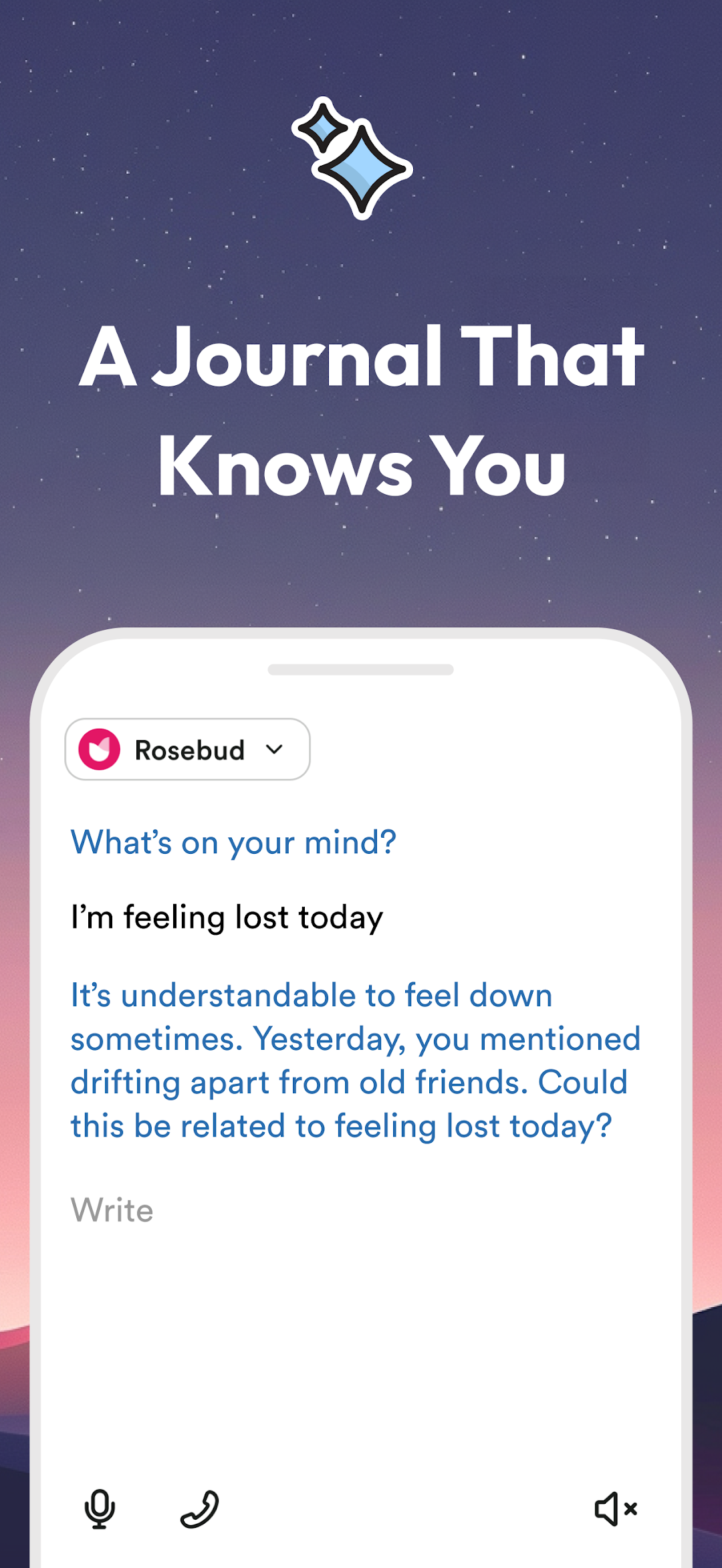
Rosebud is a personal development app built around AI journaling. Instead of handing you a blank page, it reads what you write and responds with follow-up questions, so a single entry can unfold into a back-and-forth that goes deeper than you usually would on your own. The prompts lean reflective and CBT-style, nudging you to examine a thought rather than just record it.
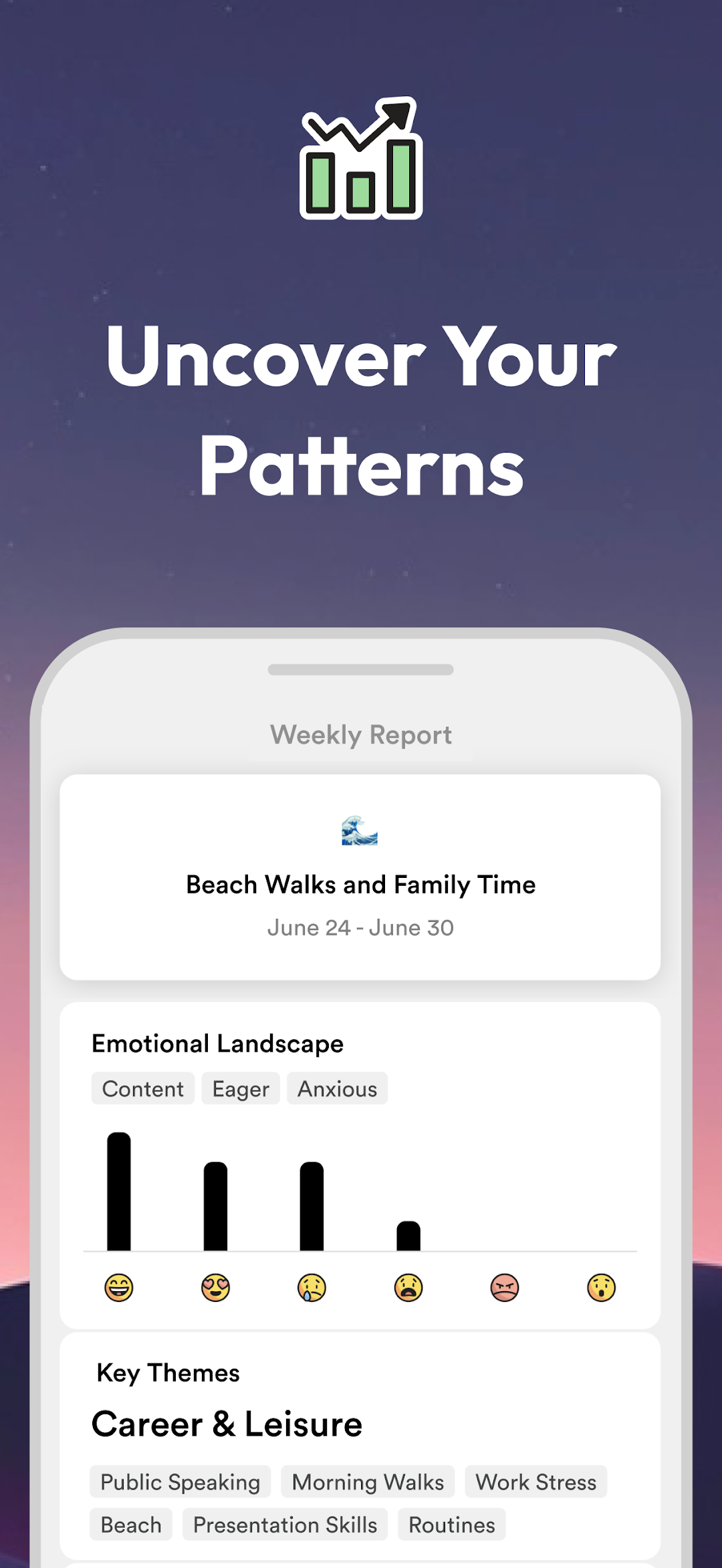
What sets it apart from a plain diary is what happens across many entries. Over weeks the app surfaces recurring themes and patterns, connecting things you mentioned on different days that you might never have linked yourself. It runs on iOS, Android, and the web, and it includes crisis resources, an acknowledgment that journaling about hard things can lead somewhere that needs more than an app.
Who is Rosebud best for?
Rosebud is best for people who think better when they are prompted. If you have ever opened a notebook, stared at the empty page, and closed it again, the guided questions remove that friction by always giving you something to respond to.
It also suits anyone interested in pattern-spotting over time. If you like the idea of an app noticing that your low days cluster around certain situations, or that a worry keeps resurfacing, Rosebud is built to reflect that back. And it fits people who want AI-guided reflection rather than a static template, because the conversation adapts to what you wrote instead of repeating fixed prompts.
What it's like to use Rosebud
The experience feels less like filling in a journal and more like talking to a thoughtful, patient listener. You write a few lines about your day, and Rosebud responds with a question that pushes a little further. That single nudge is often the difference between a surface-level note and a genuine bit of self-examination.
The follow-up questions are the part that stood out most. They tend to be genuinely useful rather than generic, picking up on the specific thing you said and asking the obvious next question you somehow skipped. It does not feel like a chatbot reaching for filler; it feels like something that read your entry and wanted to understand it.
Over time the app starts pointing out themes, and that is when the value compounds. Seeing a pattern named, one you had felt but never quite articulated, is a small but real moment of clarity. Because it works across phone and web, you can jot a quick entry on the move and reflect at length later.
Rosebud's features in depth
The core feature is conversational, AI-guided journaling. You write, and the app asks follow-up questions that draw out more than you would offer unprompted. The prompts draw on reflective and CBT-style approaches, so they often steer you toward reframing a thought or examining the evidence behind a feeling rather than just venting it.
The second standout is pattern and theme detection. Rather than leaving your entries as disconnected notes, the app surfaces recurring themes across them, so your history becomes something you can learn from. That cross-entry view is harder to get from a traditional journal, where spotting patterns falls entirely on you.
It is also genuinely cross-platform, with iOS, Android, and web all covered. Importantly for a tool aimed at wellbeing, it includes crisis resources, pointing you toward real support when an entry signals you need more than prompts. Rosebud helps build self-awareness and supports everyday wellbeing, but it is a reflection tool, not a substitute for professional care.
Rosebud pricing and value
Rosebud follows the familiar pattern for this kind of app: you can try the core journaling experience, while the fuller set of AI features and deeper pattern analysis sits behind a subscription. For the exact figures, check the pricing section on this page.
On value, the question is how much you lean on prompting. If the follow-up questions are what get you writing at all, and the surfaced themes give you insights you would not have reached alone, the subscription can pay for itself in clarity. If you are happy writing freely without an AI to draw you out, a simpler journaling tool may serve you just as well, since you would be paying mainly for the guidance layer.
What users say about Rosebud
Reviewers most often praise the quality of the follow-up questions, describing them as the thing that finally got them journaling consistently. The sense that the app is actually listening, rather than serving canned prompts, comes up repeatedly as the reason it sticks.
People also call out the pattern-spotting as a highlight, the moment the app named something they had been circling for weeks. A recurring note from those it did not suit is that AI-led journaling is not for everyone; some prefer the quiet of an unguided page and find the questions intrusive. Others note that, useful as it is, it is narrower than an all-in-one plan, covering reflection well but leaving the rest of a routine to other tools.
Rosebud vs Liven: how they compare
Rosebud and Liven overlap on reflection but aim at different things. Rosebud is focused AI journaling, and within that lane it is strong: the conversational prompts and theme detection do guided reflection better than a general-purpose app usually can. If adaptive journaling is the single thing you want, Rosebud is built precisely for it.
Liven is built to be all-in-one. Alongside journaling and reflection prompts, it layers in mood tracking, courses, habit-building, and an AI companion, so reflection is one part of a wider routine. Where Rosebud goes deep on a single entry, Liven connects that reflection to the other pieces of changing a habit or a pattern.
The fair takeaway is that the better pick depends on scope. If you want a dedicated, deep AI journaling experience and are happy to handle the rest of your personal development elsewhere, Rosebud is an excellent choice. If you want journaling as part of a broader plan that also tracks, teaches, and nudges, Liven is the more complete fit. You can read our full take in the Liven review.
Maker: Rosebud · Platforms: iOS, Android, Web · Approach: Self-guided, AI-led · Methods: journaling, reflection, CBT-style prompts
Rosebud plans & pricing
Free tier: Limited free entries; subscription for full use.
Trial: Free trial offered.
Prices approximate, as of June 2026 — verify on the App Store / Google Play. Unlimited AI journaling, insights and history need a subscription.
Cancellation: Cancel through your app-store or web subscription.
Feature checklist
- Mood trackingLight
- JournalingYes
- AI companionYes
- Courses & lessons—
- Meditations—
- Soundscapes / focus music—
- Habit & routine builder—
- RemindersYes
- Quiz / assessment—
- Community—
- Live coaching—
- Crisis resourcesYes
- Data exportYes
- Apple Health / Google Fit—
- Home-screen widgetsYes
- Offline usePartial
Rosebud pros & cons
What's good
- The AI asks genuinely useful follow-up questions
- Surfaces themes and patterns across entries
- Cross-platform with web access
What to weigh up
- AI-led journaling won't suit everyone
- Narrower than an all-in-one plan
Support
Support runs through Rosebud's help resources.
Method & credibility
Uses reflective and CBT-style prompts; a self-help tool, not treatment.
Privacy & data
Journaling is sensitive — review Rosebud's privacy policy for storage and AI-processing details.
Third-party ratings
- 4.7 / 5 on App Store — as of June 2026, verify
- 4.3 / 5 on Google Play — as of June 2026, verify
We report independent ratings with their source and date and never invent them. Figures here are approximate and pending verification before launch.
Our data: Rosebud
Two proprietary indices we score ourselves, on the same scale for every app (see all 20 on the compare page):
Rosebud FAQ
Is Rosebud good for AI journaling?
Yes. Rosebud is one of the stronger AI journaling apps for people who think better when prompted, mainly because its follow-up questions draw out more than a blank page would and it surfaces recurring themes across your entries over time. It supports everyday self-awareness, but it is a reflection tool rather than a replacement for professional care.
Is journaling in Rosebud private and safe?
Journaling is deeply personal, so privacy matters with any app you trust with it. Rosebud is an AI journaling tool, which means your entries are processed to generate prompts and surface patterns, so it is worth reading its current privacy terms before you commit. It also includes crisis resources, pointing you toward real support if an entry signals you need more than guided prompts.
Should I choose Rosebud or an all-in-one app like Liven?
Choose Rosebud if you want a focused, deep AI journaling experience and are happy to cover the rest of your routine with other tools. If you would rather have journaling as one part of a broader plan that also handles mood tracking, courses, habits, and an AI companion, an all-in-one option like Liven covers more ground.